Up and running

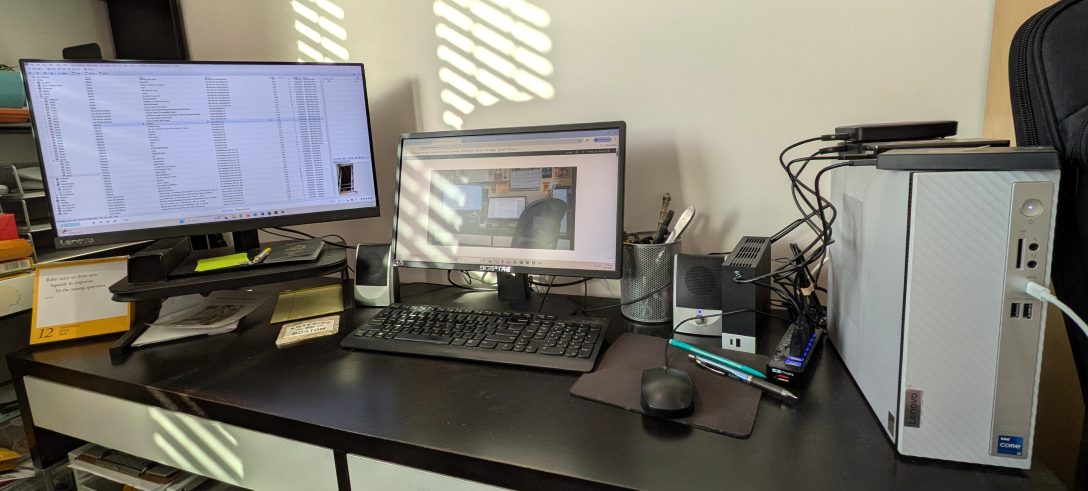
The new PC is up and running here in Spare Oom, and I’ve been spending my free time setting up the apps and programs I use the most. As I did with the restore of the older computer, I’m trying to keep it minimal. Do I really need this program taking up space? Do I even use that app anymore? There’s a handful of Must Haves, of course — Office 365 for the writing and MediaMonkey for the tunage, along with the couple of security apps — but I’m fine with not uploading certain programs unless I actually need them. This PC also has a much smaller footprint and I’m fine with that, but I may need to figure out a new setup for my externals, which are currently and precariously balanced on top of it at the moment.

And in a shocking move, I’ve decided to not set up Dropbox locally for reasons of finite hard drive storage space, meaning my writing is pretty much solely on its cloud. Mind you, I already have a copy of the folders on an external that I set up a day or so ago, so I can just do a manual ‘save as’ whenever I finish my writing session.

Either way, I’m glad that I made the move. Now I just need to get writing again!
Upgrade time

The Spare Oom PC is finally starting to show its age. Which is actually not surprising at all, since I’ve had this one for four years. It’s seen a lot of use between August of 2019 and now: music streaming and playing, novel writing, movie watching, Plex servering, internetting, job searching, 750 Words posting, blogging, and more. That’s a hell of a lot of words, music and visuals. Recently the PC has been consistently rebooting overnight, possibly due to a system failure, and the internet connectivity seems to drop out a lot when I’m multitasking online. It’s still a workable PC when it’s not acting up, but it’s only a matter of time at this point.

So on Saturday we ordered me a new replacement PC. I’m sticking with Lenovo this time, partly because this current one (an ideacentre 720, which is no longer made) stayed with me for so long with minimal problems for the longest time. I’ve mentioned before that my PCs usually last about three years before they start acting up, and four is actually a record for me! The new one is an ideacentre 3i which is a slight upgrade in terms of processing. It’s a bit smaller in storage space, but I’m okay with that considering that pretty much everything important to me lives on multiple external drives. It also doesn’t have a cd/dvd drive, but that’s okay too because I have a portable one of those as well that also reads blu-rays.

Meanwhile, as I wait for the new PC to arrive I will be shifting whatever’s left of the important stuff (photos, documents, and so on) to an external and/or to Dropbox for safekeeping. This means it might take me a little longer to Get Back To Work as I proposed on Friday, but it’s worth the wait.

More on cleaning out the PC

It’s kind of fascinating to go into the Apps section of my PC just to see what software I’ve downloaded over the years, and if I’ve in fact used any of it. I know there are a few beta-version downloads that I’ve tried because hey, why not, and they’re free. I’ll also admit to downloading a few with the best of intentions and not used them at all. But for the most part, there’s only a tiny core list that I’ll install for each new PC or laptop I get:

Office 365 (includes Word, Excel, etc). Obviously for my writing and other related things. I use this pretty much every single day so I’ve more than made the yearly subscription worth it. And I can use it on multiple computers!
Dropbox. I’ve had a fine experience with this particular cloud storage and have no plans to go elsewhere. The one app I have on everything: the PC, the laptop, the tablet, even my phone.
MediaMonkey, my audio player of choice on the PC for at least a decade or so. It does what I want it to, works fantastic as a library, and if there have been any issues, they’ve been extremely minor and fixable. [I do have an iTunes account, but I only use that for the rare download. Same with Spotify: I have a free account but use it sparingly.]

I use other software for various things here and there, but those are the core three, and the three I use the most. Everything else I’ll grab as needed. Art editing software, music editing software, downloaders, rippers, PC cleaners and firewalls, and so on. Over the years I’ve gotten a LOT better at asking myself do I REALLY need this…? before I download a program. Some I will definitely use at least a few times a month or so, but if I’m not going to be using it for the next six months, maybe I can hold off.

My plan this time out is to maintain a cleaner hard drive, especially now that I’ve also cleaned up my external drives. I’m trying to avoid the mistake I made multiple times in the past, where everything just accumulates and clutters it all up. I’ll also disable a lot of the programs I never use. This will mean a quicker start time, faster processing, and hopefully a longer life!

Updating the hardware (and the cloud)

This past weekend I did something I haven’t done in years: I ordered a new PC before my current one started dying a slow and horrible digital death. I’ve had my current one — an HP Envy 750-114 — since early 2016, and the average lifespan for my PCs is three to four years. It’s still working okay, though it’s starting to slow down to the point where it’s noticeable compared to my new laptop. I’m most definitely not a gamer, but I put my PCs through a hell of a lot, in between novel writing, internetting, song streaming, cd ripping, downloading, and everything else. I always need a PC with a good processor that will let me do all that multitasking. [Added to that, I also ordered a new monitor to replace the one I have…which dates back multiple PCs to 2006! This too works fine, but uses a cable that PCs no longer use. Both of these will be donated once they’re cleaned.]

It feels weird to do this, as I’m more used to squeezing every ounce of use out of it until it finally screams that’s it I’m done and refuses to turn back on. This time out, it’s the mouse and keyboard that are kicking it first. No big surprise, considering. I happened to have a spare wireless combo lying around the house so that’s taking its place until the new PC comes in.

I suppose this is all part of my ongoing KonMari Tidy-Up Project here in Spare Oom. I recently finished cleaning up all the old word files I’d had kicking around, deleting the duplicates (and there were MANY) and properly sorting them in subfolders. In the process I took out the old filing system on my Dropbox account and uploaded the new and much improved one. Suffice it to say, my DB account thus sent me a few emails asking if I was okay, considering I’d deleted a few thousand files within a few days. It’s actually kind of comforting that my cloud storage account keeps tabs like that. Anyway, all is sorted (literally) and things are much easier to find now.

SO! This of course means that I’m already planning out what needs moving from this PC over to the externals for temporary storage so I can upload them once the new PC is up and running. This, of course, is precisely why I had all those damn duplicates in the first place. Over the course of a decade and a half, I had the bad habit of taking this exact step…only to keep the backup files on cds or externals and never getting rid of them once they were safely back on the new main drive. They just all piled up after a while.

Hopefully this major cleanup — and a reminder to delete those backups once they’re good to go on the cloud — will avoid further confusion. Here’s to hoping it all runs smoothly!